1 / 4
TP-Link
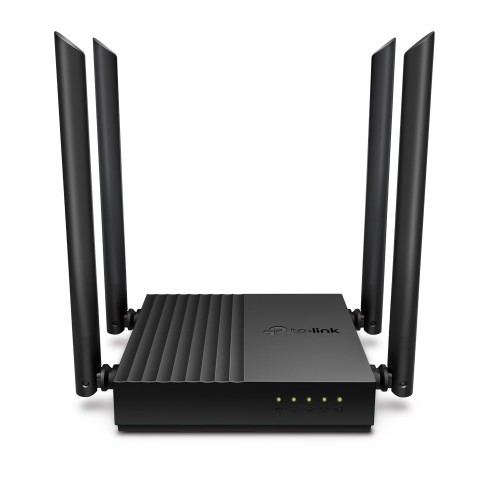
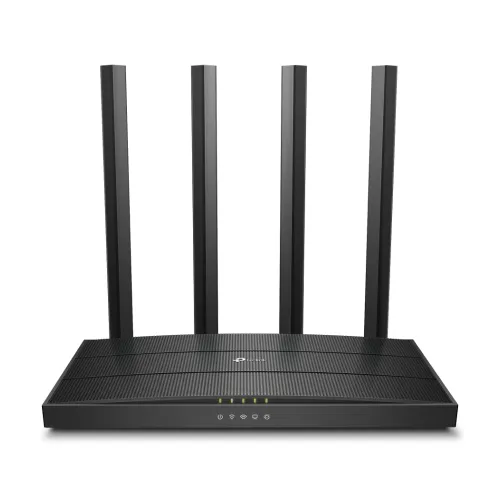
<p>## Basic Information Brand: TP-Link Model: Archer C54 Type: AC1200 Dual Band Wi-Fi Router ## Wireless Wi-Fi…
In stock · only 4 left
৳1,900
1
Available at:Uttara Branch
- 100% genuine product
- Official warranty
- Same-day branch pickup
Specifications
| General Information | |
|---|---|
| Brand | TP-Link |
| Category | Networking › Wi-Fi Router |
| Key Features | |
| <p>## Basic Information Brand: TP-Link Model: Archer C54 Type: AC1200 Dual Band Wi-Fi Router ## Wireless Wi-Fi Standards: IEEE 802.11ac/n/a (5 GHz) IEEE 802.11n/b/g (2.4 GHz) Wi-Fi Speed: 5 GHz: 867 Mbps (802.11ac) 2.4 GHz: 300 Mbps (802.11n) Frequency: 2.4 GHz and 5 GHz (Dual Band) Antennas: 4 x Fixed External Antennas Beamforming: Yes MU-MIMO: Yes Wireless Security: WEP, WPA, WPA2, WPA/WPA2-Enterprise (802.1x) ## Hardware WAN Port: 1 x 10/100 Mbps LAN Ports: 4 x 10/100 Mbps Buttons: WPS/Reset Button Power: 9V ⎓ 0.85A ## Software Operation Modes: Router, Access Point, Range Extender WAN Types: Dynamic IP, Static IP, PPPoE, PPTP, L2TP Guest Network: 1 x 2.4 GHz, 1 x 5 GHz Management: TP-Link Tether App, Web Interface Other Features: Parental Controls, QoS, IPv6, Access Control ## Package Content In the Box: Archer C54 Router Power Adapter RJ45 Ethernet Cable Quick Installation Guide</p><p>## Description The TP-Link Archer C54 is an AC1200 dual band Wi-Fi router built for everyday home internet. It combines 867 Mbps on the 5 GHz band with 300 Mbps on the 2.4 GHz band, so HD streaming and video calls can run on 5 GHz while smart-home devices and browsing stay on 2.4 GHz.</p><p>Four external antennas with Beamforming focus the signal towards connected devices for more reliable coverage, and MU-MIMO lets the router serve several devices at the same time instead of one after another</p><br><p>Setup takes a few minutes with the TP-Link Tether app. From there you can create a separate guest network, set parental controls, and prioritise bandwidth with QoS. The C54 can also run as an access point or range extender, so it stays useful if you change your internet setup later.</p> | |
Description
<p>## Basic Information Brand: TP-Link Model: Archer C54 Type: AC1200 Dual Band Wi-Fi Router ## Wireless Wi-Fi Standards: IEEE 802.11ac/n/a (5 GHz) IEEE 802.11n/b/g (2.4 GHz) Wi-Fi Speed: 5 GHz: 867 Mbps (802.11ac) 2.4 GHz: 300 Mbps (802.11n) Frequency: 2.4 GHz and 5 GHz (Dual Band) Antennas: 4 x Fixed External Antennas Beamforming: Yes MU-MIMO: Yes Wireless Security: WEP, WPA, WPA2, WPA/WPA2-Enterprise (802.1x) ## Hardware WAN Port: 1 x 10/100 Mbps LAN Ports: 4 x 10/100 Mbps Buttons: WPS/Reset Button Power: 9V ⎓ 0.85A ## Software Operation Modes: Router, Access Point, Range Extender WAN Types: Dynamic IP, Static IP, PPPoE, PPTP, L2TP Guest Network: 1 x 2.4 GHz, 1 x 5 GHz Management: TP-Link Tether App, Web Interface Other Features: Parental Controls, QoS, IPv6, Access Control ## Package Content In the Box: Archer C54 Router Power Adapter RJ45 Ethernet Cable Quick Installation Guide</p><p>## Description The TP-Link Archer C54 is an AC1200 dual band Wi-Fi router built for everyday home internet. It combines 867 Mbps on the 5 GHz band with 300 Mbps on the 2.4 GHz band, so HD streaming and video calls can run on 5 GHz while smart-home devices and browsing stay on 2.4 GHz.</p><p>Four external antennas with Beamforming focus the signal towards connected devices for more reliable coverage, and MU-MIMO lets the router serve several devices at the same time instead of one after another</p><br><p>Setup takes a few minutes with the TP-Link Tether app. From there you can create a separate guest network, set parental controls, and prioritise bandwidth with QoS. The C54 can also run as an access point or range extender, so it stays useful if you change your internet setup later.</p>
Reviews
No reviews yet
Bought this from one of our branches? Tell our staff how it went.
Related Products
Explore All